


They bring together the effort you put in and how your cardiovascular system responded into one number you can easily track from workout to workout.
Think of them as a simple summary of your session:
• Sweat Points tell you how much intensity you sustained.
• Recovery Points tell you how efficiently your heart bounced back.
Together, they help you see patterns in your training — without overcomplicating the data.
• Every workout, you earn Sweat Points based on the heart-rate zones you train in.
• At the end of class, you earn Recovery Points based on how quickly your heart rate drops after a high-intensity challenge.
• These two numbers are added together to give your BEAT Points.
No algorithms hidden behind “mystery scores.” Just clear physiological signals turned into something easy to understand.
For example:

• Higher BEAT Points → you spent meaningful time in higher-intensity zones and your heart recovered well at the end.
• Moderate BEAT Points → a balanced effort, common during strength-dominant or steady sessions.
• Lower BEAT Points → intentionally easier work, or a day where fatigue, sleep, or stress influenced your effort or recovery.
A “low” score is not a failed workout — it just reflects a different training stimulus or a different day for your body.
Long-term trends are what matter:
• Trending up (in similar workouts): Suggests your body is adapting — you’re able to work harder, recover faster, or both.
• Staying steady: Often a sign of consistent training and stable cardiovascular conditioning.
• Trending down: May reflect fatigue, stress, illness, poor recovery, or an imbalance in training load. A cue to adjust sleep, hydration, or session intensity — not a reason to panic.
BEAT Points help you spot whether your training rhythm is supporting your progress — especially when life factors come into play.

Sweat Points quantify how hard you worked, based on the time you spend in each heart-rate zone. Calculated from your personal max heart rate, they reflect the effort you put into your workout, offering a consistent way to understand intensity across workouts.
You earn points for every full minute spent in each heart rate (HR) zone:
• 91–100% of max HR: 4 points per minute
• 81–90%: 3 points per minute
• 71–80%: 2 points per minute
• ≤70%: 1 point per minute
The higher the zone, the more Sweat Points you earn. This turns your effort profile into a number that’s easy to compare across days, formats, and phases of training.
For example:
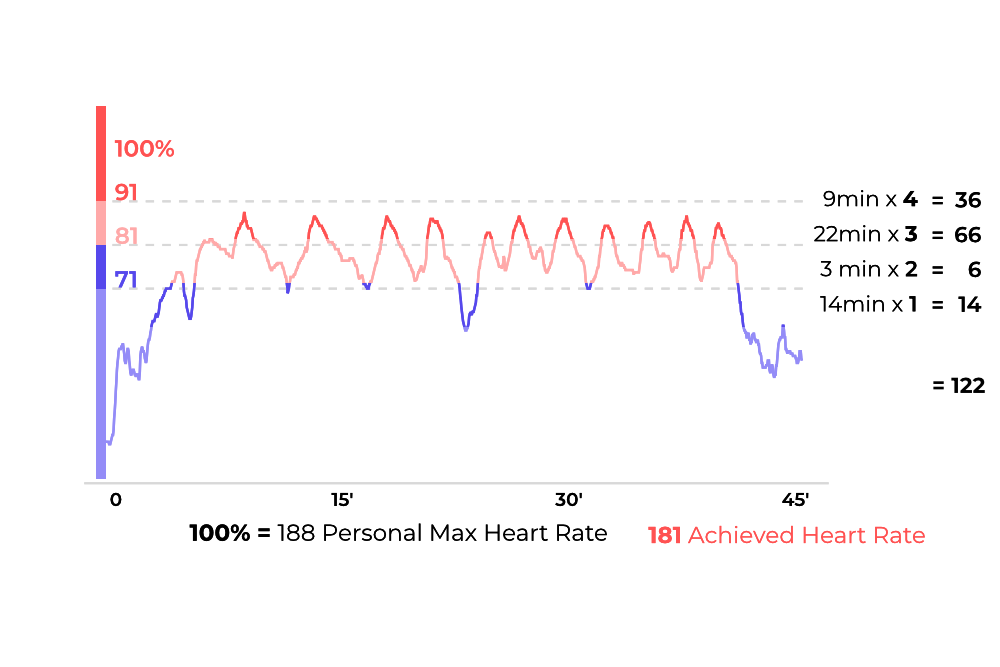
• High Sweat Points → sustained time in high-intensity zones (e.g., in BURN or HYBRID).
• Moderate Sweat Points → controlled, steady intensity (great for building base fitness or strength-focused days).
• Lower Sweat Points → intentional recovery, technical focus days, or days where fatigue limits how high your HR climbs.
Sweat Points tell you about effort, not fitness — so interpret them with that nuance:
• Stable or rising Sweat Points (same workout type): You’re able to consistently work at high relative intensity.
• Sweat Points lowering despite trying: Can indicate under-recovery, stress, illness, poor sleep — or that you’ve raised your fitness baseline and need more power/speed to hit higher zones.
• Sweat Points staying moderate while workouts feel easier: A sign your aerobic conditioning is improving — your body has become more efficient at the same workload.
Sweat Points help you understand how much intensity you’re putting into your training — and whether that matches your goals.

Recovery Points measure heart rate recovery (HRR) — one of the clearest indicators of cardiovascular fitness. A faster recovery after effort often reflects stronger cardiovascular conditioning.
At the end of your workout:
1. You perform a 1-minute challenge where your peak heart rate is recorded (e.g. 166 bpm)
2. In the following minute, we track the lowest heart rate you reach (e.g. 132 bpm).
3. Recovery Points = Peak HR – Lowest HR after 1 minute.
A higher number = a faster drop = stronger recovery.
For example:
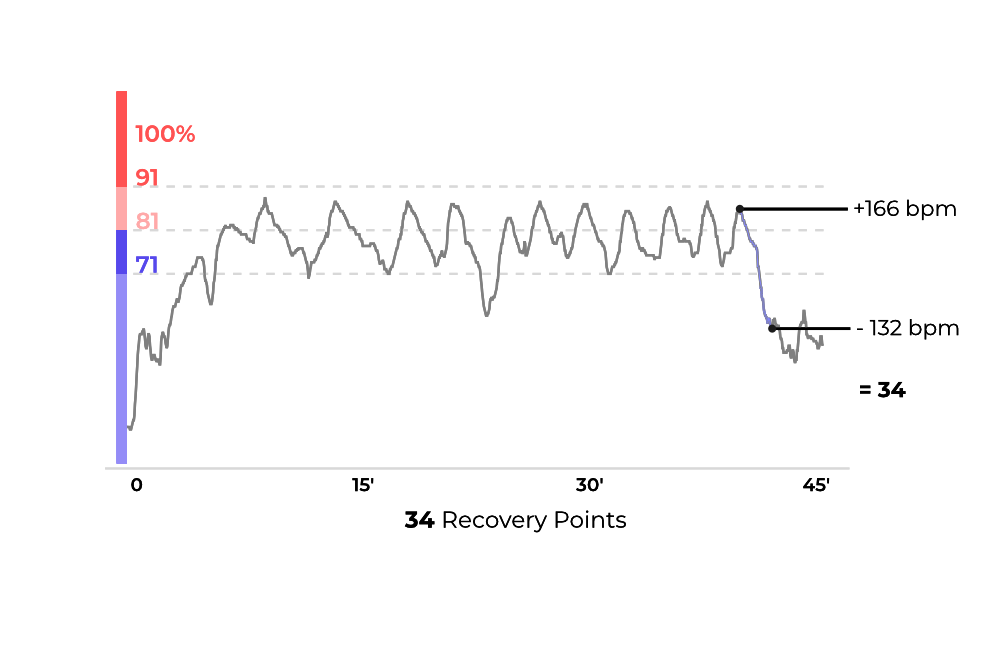
• High Recovery Points: Your heart is recovering quickly — often a sign of good cardiovascular conditioning and/or that you arrived well-rested.
• Moderate Recovery Points: Normal after a demanding class, a big push near the end, or days when you’re not fully rested.
• Low Recovery Points: Often influenced by fatigue, dehydration, stress, illness, or continuing to move during the recovery minute (e.g., walking around).
Not a verdict on your fitness — just feedback on today’s physiology.
Recovery Points are most valuable in long-term patterns:
• Trending up across similar workouts: Strong sign that your cardiovascular fitness is improving.
• Holding steady while your workouts get harder: Great sign — your recovery system is keeping up.
• Trending down persistently: A signal to adjust training load, sleep, or stress.
This is how HRR is used in elite training environments — to balance effort with recovery.
Recovery Points give you an honest read on how your heart adapts to the training you’re doing — one of the most meaningful signals you can track. Because they are usually recorded after a short push towards the end of the workout, they allow you to compare your performance session to session and check how your fitness improves over time. Use the table below to understand where you stand at the moment:


At BEAT81 we calculate two types of calorie burn:
We use two standard formulas here:
We use the Keytel formula to calculate your Gross Calorie Burn, meaning calories burned during exercise. We then use the Harris-Benedict formula to calculate your Basal Metabolic Rate: how many calories you would have burned resting. Finally, subtracting your “resting” calories from the gross calories you burned during the workout gives us the calories you burned during your BEAT81 workout.
Keytel Formula used to calculate Gross Calorie Burn:
Male:
(-55.0969 + 0.6309 * average heart rate + 0.1988 * weight + 0.2017 * age) / 4.184 * 60* durationInHours
Female
(-20.4022 + 0.4472 * average heart rate - 0.1263 * weight + 0.074 * age) / 4.184 * 60 * durationInHours
Harris-Benedict formula used to calculate Basal Metabolic Rate (calories burned per 24 hours):
Male:
13.75 * weight + 5 * height - 6.76 * age + 66
Female:
9.56 * weight + 1.85 * height - 4.68 * age + 655
Calculating the Resting Metabolic Rate calorie burn for the workout duration:
Basal metabolic rate * 1.1 / 24 * durationInHours
Calculating calorie burn during a workout:
Net calorie burn = Gross calorie burn - Resting metabolic rate calorie burn
When you exercise close to your maximum heart rate your body requires additional O2 after the workout to recover - this is called excess post-exercise oxygen consumption (EPOC). Your EPOC is bigger the more minutes you train close to your maximum heart rate. Therefore, the longer you train above 80% the more calories you burn via EPOC after the class.
How we calculate post workout calories:
Trained above 80% for less than 8.5 minutes -> EPOC calories = Workout calories * 0.2
Trained above 80% for more than 8.5 and less than 16.5 minutes -> EPOC calories = Workout calories * 0.25
Trained above 80% for more than 16.5 minutes -> EPOC calories = Workout calories * 0.2
The total calories you burn thanks to the class is the sum of workout calories and EPOC calories.

Your spinning bike works with resistance to simulate riding a bike on a flat road, uphill or downhill.
The knob (or dial) in the center can be turned to the right to increase resistance or to the left to decrease resistance. Turn it halfway to feel a difference. You can also always press the knob down to stop your bike completely.
When you get on your bike the resistance is set to 0 (or “downhill”) - which we will never use at a BEAT81 workout. Therefore always turn the knob to the right until you feel some resistance. You are now on the flat road.
Now it gets interesting: above the knob there is a lever (or SprintShifter), which allows you to significantly increase resistance to simulate hills (or a mountain). The default setting is on the left (or “1”). By moving the lever to the middle (or “2”) you increase the resistance by 70%. Moving the lever to the right (or “3”) increases resistance by 100%.
During the ride our coaches will instruct you when to increase or decrease resistance using the “dial” or the “shifter”.
